Operating views, wherever the work goes
What Should a Mobile Operations Dashboard Help You Do on iPhone and iPad?
A useful mobile view should carry the right decision, context, and boundaries with you—not squeeze an entire desktop onto a smaller screen.
Bella Johnson
Operations
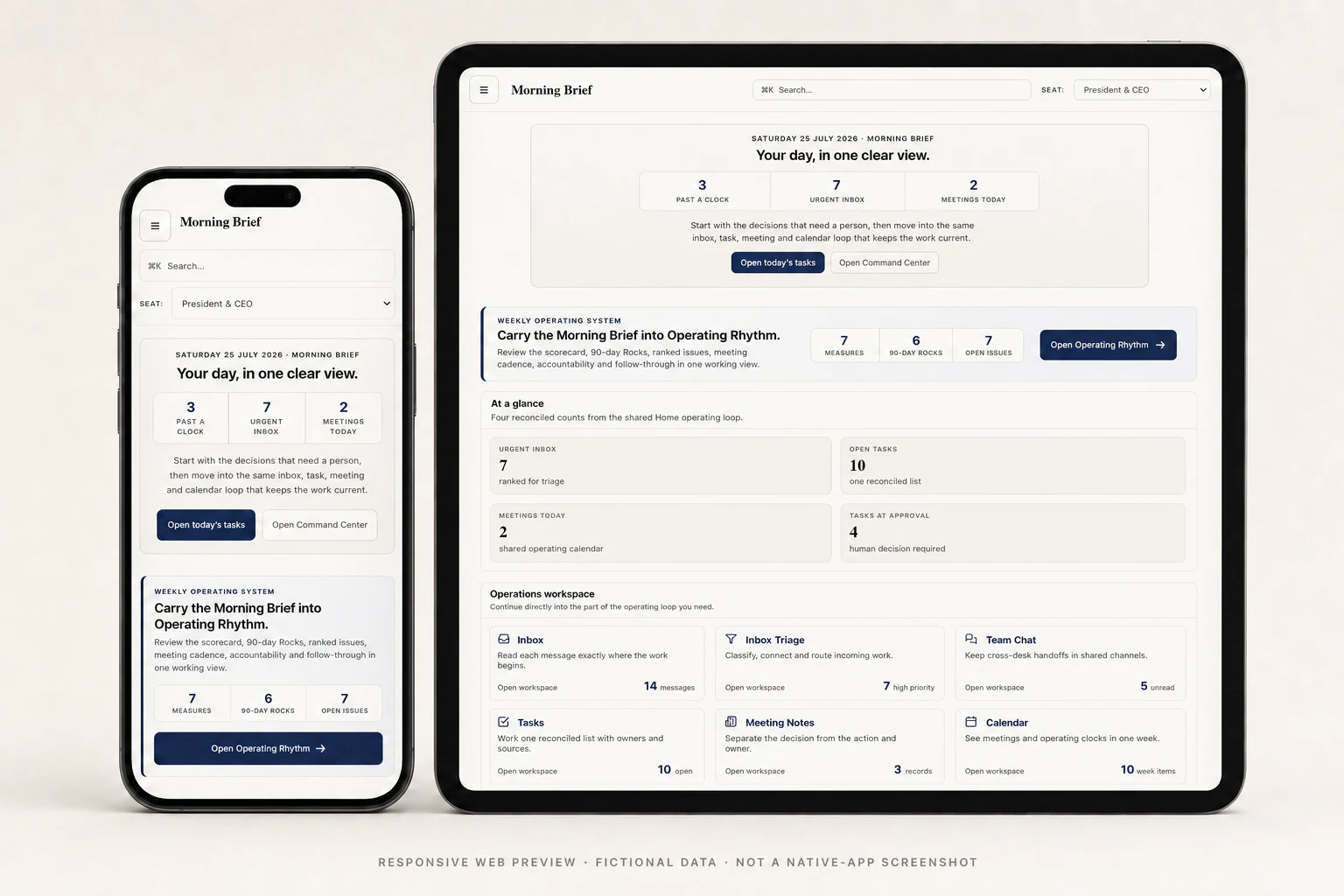
A useful mobile operations dashboard should show what changed, why it matters, and what responsible next step is available—without making you open several apps or rebuild the story yourself. On iPhone, that usually means a focused checkpoint. On iPad, it can become a fuller working view.
The goal is not to squeeze an entire desktop into your hand. It is to keep the operation understandable when the person who needs to respond is somewhere else.
What decision belongs on the mobile screen?
Mobile design is often treated as a resizing exercise. Operations work asks a better question: what does this person need to know or do right now?
A useful view should identify the change, its source, the owner, any deadline or exception, and whether a person needs to decide.
Digital Offload treats mobile access as part of the workflow design. The same records, rules, permissions, and human checkpoints should carry across devices. The screen can change the depth of the view; it should not change the truth of the work.
What is an iPhone view good at?
A phone is well suited to short, bounded moments: a morning handoff, a stalled follow-up, a calendar change, an invoice mismatch, or an approval ready for review.
The useful version does more than surface an alert. It provides enough context to respond responsibly: what happened, where the record lives, who owns it, and what remains open. Depending on the approved workflow, the person may review, route, defer, or approve a defined next step.
Imagine a configured billing workflow finds a payment that does not match an open invoice. Instead of searching the payment system, accounting software, and project record separately, a mobile view could bring the relevant records and reason for the mismatch together. The finance lead can decide what should happen, and the result can return to the same visible operating history.
This shows one way a well-scoped mobile workflow could work; it is not a promise that every connection or action is available by default. Exact capabilities depend on the systems, permissions, and authority approved for the engagement.
What should an iPad view make easier?
An iPad can give longer briefs, supporting records, and more deliberate review room to breathe. It may be a better surface for comparing a report with its sources, working through a meeting agenda, or checking a queue while moving between conversations.
| Device | Best suited to |
|---|---|
| iPhone | Focused briefs, exceptions, routing, and defined approvals |
| iPad | Deeper review, comparison, meetings, and prepared work |
| Desktop | Configuration, extended analysis, and large edits |
Should mobile access change who is allowed to do what?
No. A smaller screen should never create broader authority. Existing business systems should remain authoritative. Records and actions should stay limited by approved roles. Consequential decisions should keep a human checkpoint, and each action or approval should remain visible afterward.
If a connection is unavailable or the current state cannot be verified, the interface should say so. A confident answer built from missing context is not useful operating intelligence.
A good mobile experience should surface a real exception when it matters, then stay quiet when it does not. It should help someone step in briefly—not turn the whole day into supervision.
How is Digital Offload approaching mobile work?
Digital Offload starts with the operation, not the device. During the Approach, we learn where context gets lost and where work waits for a person. Implementation defines the approved systems, permissions, checkpoints, and evidence for a bounded first release.
The Platform connects that work, while Model Employee helps a team ask what is happening and prepare a next step. Native capabilities remain separately scoped and verified.
Explore the current fictional operating views in the Demos, then see how the Approach and Implementation turn a real workflow into a practical first release.
The better question is not, “Can the whole dashboard fit?” It is, “Which decisions should travel with me—and which should move forward without needing me at all?”
In plain language
Frequently asked questions.
What is a mobile operations dashboard?
It is a role-aware view of current work, exceptions, owners, supporting records, and permitted next steps, designed for a phone or tablet.
Is Digital Offload available as a public iPhone or iPad app?
Not currently. As of September 2, 2026, Digital Offload has an iPhone and iPad build available only to its internal testing group in TestFlight; the current build still awaits physical-device acceptance. The public synthetic web experiences have passed responsive browser checks at mobile viewport sizes.
How should an iPhone view differ from an iPad view?
An iPhone should prioritize concise briefs and bounded decisions. An iPad can provide more room for reports, comparisons, meetings, and prepared work. Exact views depend on the approved workflow.
What should a mobile operations dashboard show first?
The change, why it matters, who owns it, and the permitted next step.
See the operating layer
Move from the idea to the working view.
Explore two complete, fictional systems and see how context, handoffs, exceptions, and human decisions stay visible.